LookAway Review for MacOS: The Break Reminder That Waits for You
LookAway holds your screen breaks back during meetings, calls and deep work instead of interrupting them, and adds blink, posture and a daily Screen Score. A MacOS break reminder that costs $19.00 USD once.
Most break reminders die the same death. They pop up in the middle of a call, get skipped, and by the end of the week the menu bar icon has been switched off and forgotten. LookAway treats the timing as the feature: it holds a break back while you're in a meeting, watching a video, sharing your screen, or deep in a fullscreen game, then shows up when you're actually free. It's a $19.00 USD one-time app for MacOS 13 and later, and it's the first break reminder that behaves like it knows what you're doing.
 LookAway
Mystical Bits sent me a free license for LookAway so it could be reviewed here, and the developer posts as @lookawaymac on X. The key did not buy a score. The verdict is the one the app earns, and a copy I had paid $19.00 USD for would be judged the same way.
What LookAway Actually Is
LookAway is a native menu bar app from Kushagra Agarwal, who builds it under Mystical Bits at lookaway.com. Version 2.5.0 landed on November 18, 2026, and it's the fourth feature release this year, so the app is clearly still moving.
The idea comes from the 20-20-20 rule optometrists recommend: every 20 minutes, look at something 20 feet away for at least 20 seconds. Out of the box LookAway runs a 20 minute session into a 30 second break. The setup docs lay out four starting rhythms, from a 45 minute deep focus session to a 15 minute eye care cycle, and every number in them can be overwritten.
It also does two things a break reminder usually skips. It nudges you to blink and to sit up, and it keeps a record of how well you actually followed the schedule. All of it lives in the menu bar: no window to leave open, no account, nothing to sign into.
Releases go up on the changelog, and Kushagra posts them on X as @lookawaymac.
Smart Pause Is the Reason to Pay
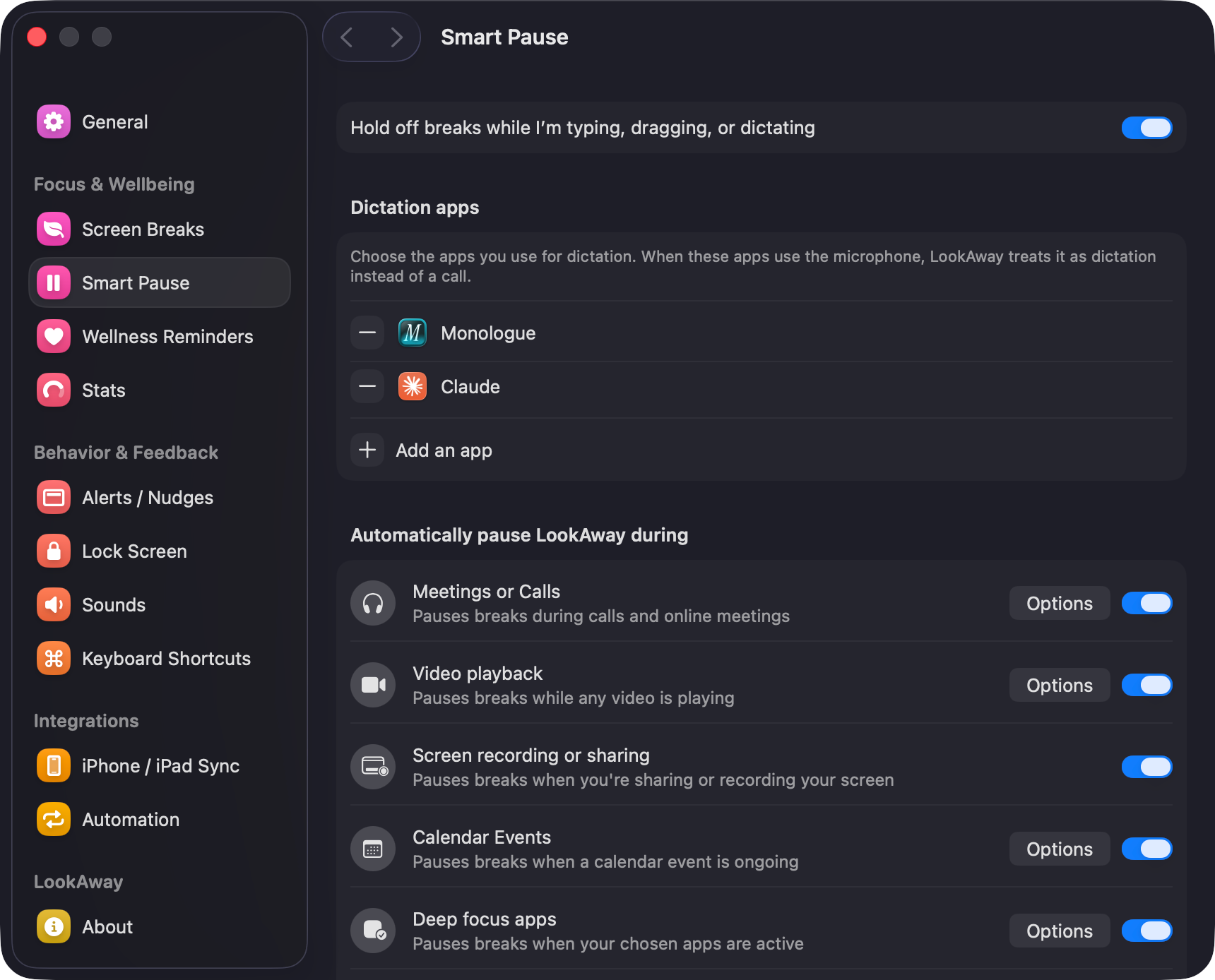
The best idea in LookAway is that a reminder arriving at the wrong moment trains you to ignore reminders. Smart Pause watches for the moments when you can't walk away and postpones the break until you can:
- Meetings and calls, detected from camera or microphone activity, with individual microphones and apps you can exclude.
- Video playback, either frontmost or in the background if you're listening along.
- Screen recording and sharing, including OBS, QuickTime and Zoom screen sharing.
- Fullscreen games, with no setup at all.
- Deep focus apps you name yourself, paused when they're in the foreground, in fullscreen, or simply open.
- Typing, dragging and dictating, which is switched off by default.
There's a cooldown too. When the activity ends you can set one, two, or five minutes before the break lands, so it doesn't ambush you the moment a call hangs up. If you step away on your own, the app quietly counts the time as a natural break, with an undo in the menu bar if it guesses wrong. That replaced a blocking dialog that asked you what happened, which was the right call.
Wellness Reminders, From Blink to Whatever You Want
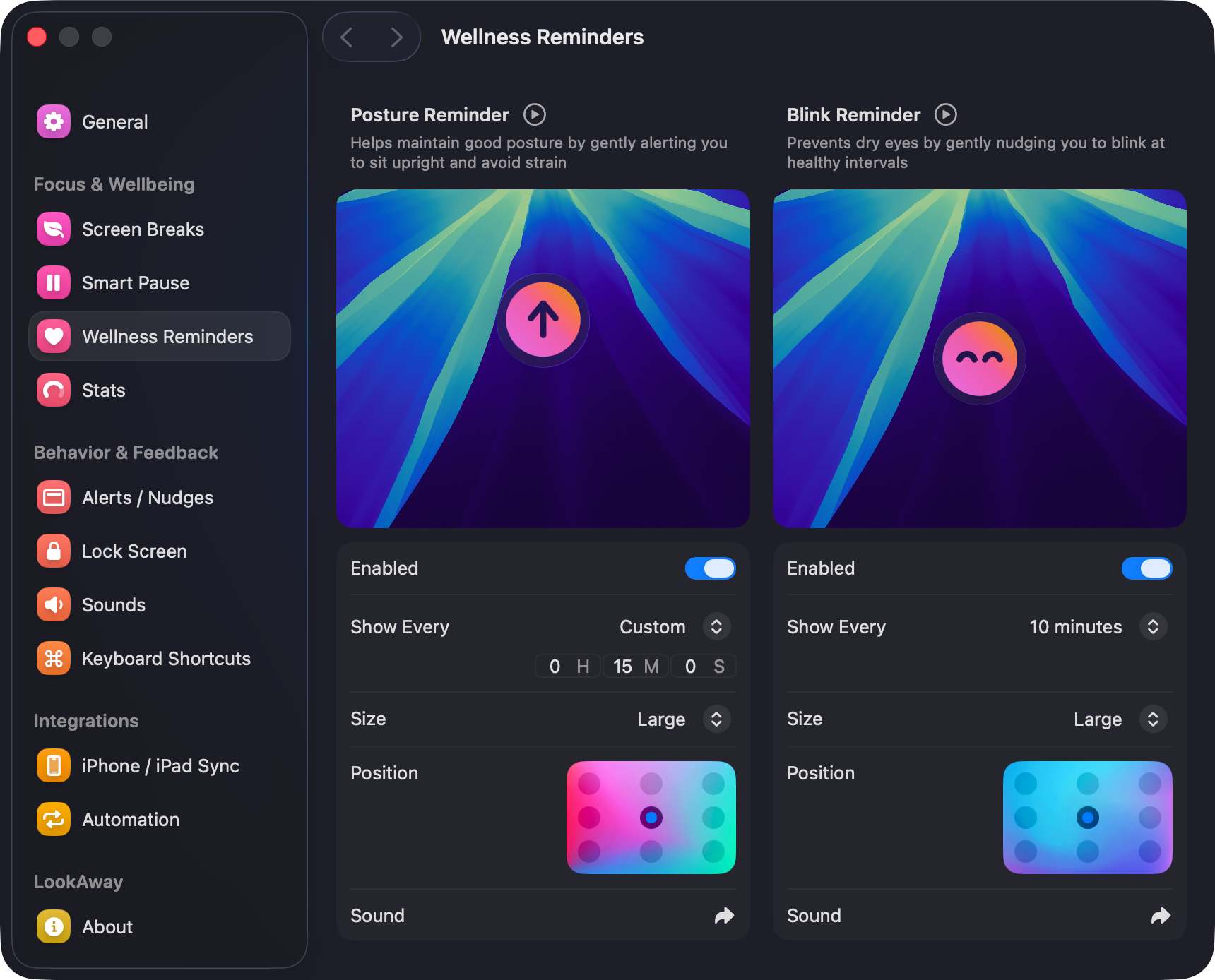
Posture and blink reminders run on their own timers. Each gets an interval, a size, a position on screen and a sound. The blink reminder is the one worth leaving on, because dry eyes show up long before anything else does. Posture gets a nudge to sit up. Both can be turned off without touching the break schedule.
Version 2.5 adds custom reminders. You can create up to five of your own, each with a title, an icon, an interval, and one of ten sounds or none at all: water, a stretch, a breath. A custom reminder can also stay on screen until you tick it off, and anything else that falls due meanwhile folds into a small orb at the top of the screen instead of stacking up.
It's the optional half of the app, and it's also the half that makes LookAway more than a timer, so the toggles are worth a look before you switch them off.
Planned Breaks, On-Demand Breaks, and Skipping on Purpose
Most break apps only count down. LookAway also lets you work from the other direction.
Planned Breaks are clock-time breaks: lunch at 1, a walk at 4, end of day. Each one gets a name, a duration, repeat days and an icon, and they still respect Smart Pause. A planned break waits if you're in a meeting, and it counts the time you already spent away so it doesn't demand a second lunch.
When you want a break right now, the menu bar, a keyboard shortcut or an AppleScript can start one at any length you name. Skipping has three settings. Casual lets you skip whenever, Balanced makes the skip button wait a few seconds, and Hardcore takes it away completely. Snooze limits cap how far one long stretch can drift, both per session and per day, and advance skips let you push a break you can see coming.
Office Hours keeps all of it inside your working day, and the overtime nudge speaks up when you've gone past the time you planned to work. Neither one is clever, and both are the kind of thing you only miss after using an app that has them.
Screen Score and the Stats Page
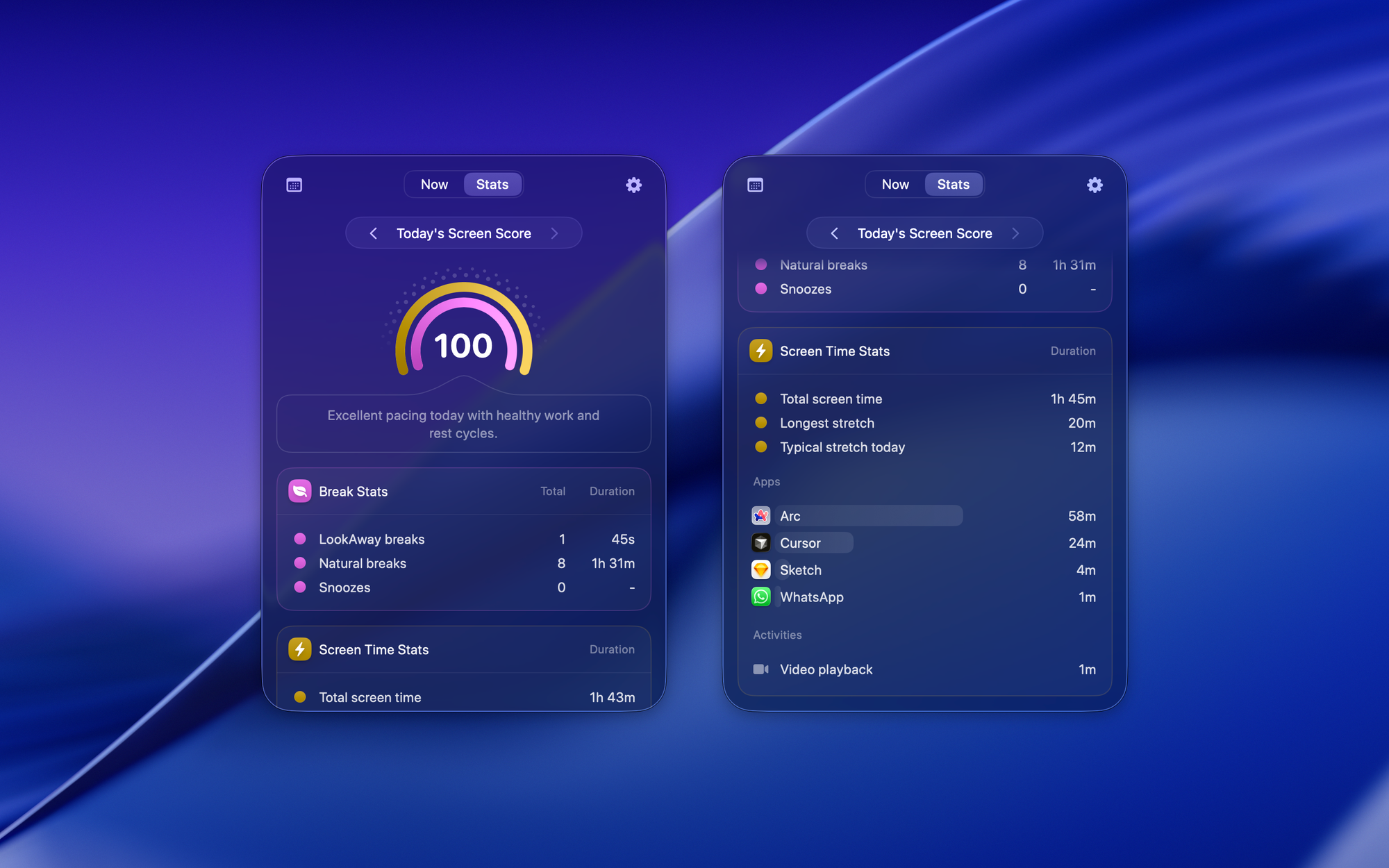
Screen Score is a single number from 0 to 100. Session discipline is worth up to 60 points and break adherence up to 40, so long stretches and skipped breaks both pull it down. It isn't a productivity score and the app doesn't pretend it is, which is the right framing: it tells you whether your break schedule is working.
The Stats page goes further. Total screen time, breaks taken, natural breaks, snoozes, longest stretch, median stretch, app usage during screen sessions, and website usage by domain. App usage is the useful one, because it's tied to active sessions instead of app-open time.
Website usage needs each browser switched on in Stats settings, and there are two caveats. The Firefox family needs Accessibility permission in the direct and Setapp builds, and the App Store build doesn't track Firefox websites at all. Safari and Chromium browsers work everywhere without it.
The Break Screen Itself
When a break starts, LookAway takes the whole screen. A gradient background, the countdown, a Skip Break button, a Lock Screen button, and a hint that pressing Esc twice snoozes for five minutes. That escalation is the design philosophy in one screen: you can skip, but you have to do it on purpose.
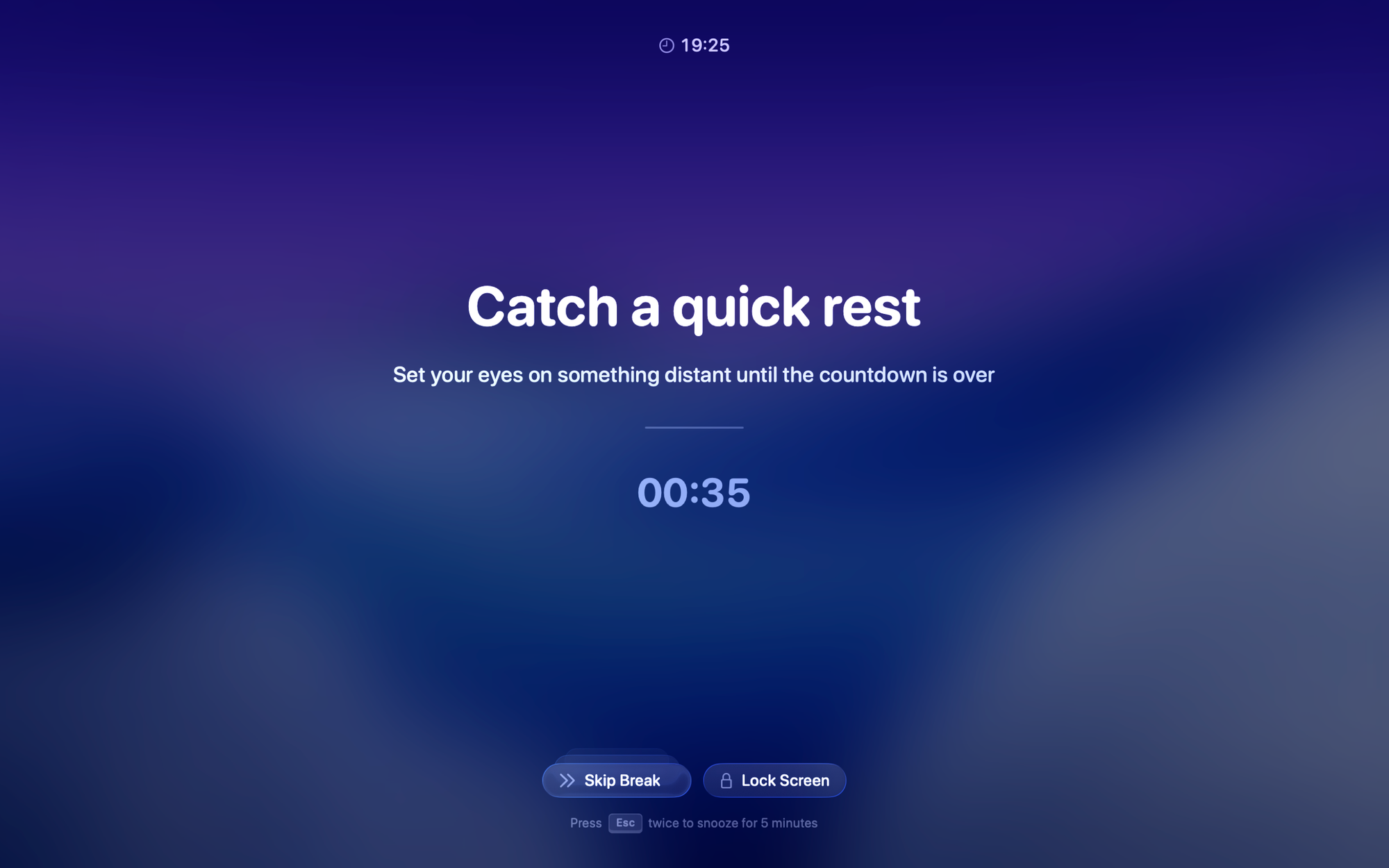
The backgrounds are animated and swappable, the break message can be your own, and the sounds run from soft chimes to spoken prompts. You can lock the Mac automatically when a break begins, or let a nearly finished break end early instead of nagging for the last few seconds.
2.5 adds a style called Split the screen, which slides the desktop apart top and bottom and puts the break on a texture between the halves: Linen, Cutting Mat, Leather or Brushed Metal. It needs MacOS Tahoe, and it's the most charming thing in the app.
What It Costs
Direct from the developer, LookAway is a one-time purchase that includes a year of updates. One seat is $19.00 USD, two seats are $29.00 USD, and five seats with lifetime updates are $99.00 USD. After the first year, renewing updates is optional and costs 50 percent of that: $10.00 USD for the first personal seat and $5.00 USD for each extra. Team licenses run $29.00 USD per seat with a five seat minimum, and students get 30 percent off a personal license. The full pricing page lists all of it.
There's a 7-day trial on the direct download, and LookAway is included in a Setapp subscription if you already pay for one.
The Mac App Store is a separate product line with subscription pricing: $4.99 USD a month, $14.99 USD a year, or $49.99 USD for lifetime. The store build also loses two things, because it runs sandboxed: the Mac lock screen countdown and website tracking for Firefox.
For most people the direct license is the better deal. $19.00 USD once is about four months of the monthly store price, and the app you get is the fuller one.
Privacy
Activity detection runs on the Mac. There's no account, no profile and no cloud copy of your stats, which is how the app can watch for meetings without sending anything anywhere.
Two things do leave. The purchase goes through Stripe, and anonymous usage analytics go through Mixpanel, with an opt-out under Settings and About. The vendor's privacy policy says the app collects no personal information on its own, and the marketing site counts visitors with Plausible.
So it isn't a zero-network app and it doesn't claim to be. For a tool that knows which apps you used and for how long, the part that matters is that the tracking stays on the machine, and it does.
Compatibility and Requirements
LookAway needs MacOS 13 Ventura or later and runs natively on Apple Silicon and Intel. Idle CPU is typically under one percent, which matters for something that sits in the menu bar all day.
Two features need a newer Mac. The Split the screen break style and the Mac lock screen countdown both require MacOS Tahoe (26), and the countdown is missing from the App Store build entirely because it relies on APIs Apple doesn't publish.
The iPhone and iPad half is a separate free app, LookAway Mirror, which needs iOS 17.2 or later, Screen Time permission and an internet connection between the devices. When the Mac takes a break, the phone blocks apps and sites for the same window, and 2.4 puts a Live Activity with the countdown on the Lock Screen. The catch is that Mirror has to keep running in the background, and the pairing is limited to three iPhones per Mac and five Macs per iPhone.
LookAway is localized in eight languages, supports VoiceOver and full keyboard navigation, and respects Reduce Motion and Increase Contrast. Windows is listed as coming soon, which is worth treating as announced rather than shipped.
How It Compares
Time Out is the free benchmark and still the better pick if you want to hand-build every interval, theme and exclusion. The core app costs nothing, with supporter and premium extras on top. What it doesn't do is notice a meeting: you teach it which apps to skip and it fires on schedule. Time Out 3 also needs MacOS 26, so Ventura, Sonoma and Sequoia users are on the older 2.9.7 build.
Stretchly is the open-source option. Free, cross-platform and perfectly capable of interrupting you at the wrong time, which is the thing LookAway exists to fix. Neither free app watches your camera and microphone to hold a break, locks your iPhone when the Mac rests, or keeps a Screen Score.
What the free options have is the price. $19.00 USD is real money next to two good free apps, and the year of updates makes the license a subscription with a very long billing cycle rather than a true lifetime purchase. That's the honest trade: you're paying for timing, not for breaks.
Pros and Cons
- ✓Holds breaks back during meetings, calls, video, games and screen sharing, with no exclusion list to maintain.
- ✓Deep controls: skip rules, snooze caps, planned breaks, Office Hours, overtime nudges.
- ✓Blink, posture and, since 2.5, up to five custom wellness reminders.
- ✓Stats and a Screen Score that show whether the schedule is actually working.
- ✓Native, light on resources, with Shortcuts, AppleScript, shell scripts and Focus Filters.
- ✓On Setapp, with a 7-day trial on the direct download.
- ✗$19.00 USD is real money next to the free Time Out and Stretchly.
- ✗Updates stop after a year unless you renew, so pay once has an asterisk.
- ✗Meeting detection reads microphone and camera use, so a solo recording can look like a call until you exclude the app.
- ✗iPhone sync needs a second app running in the background plus an internet connection.
- ✗Split the screen and the Mac lock screen countdown need MacOS Tahoe.
- ✗The App Store build is a subscription and drops the lock screen countdown and Firefox website stats.
Who Should Use It
If you turned a break timer off because it kept interrupting the wrong moment, LookAway is the one worth paying for. It fits remote workers who live in calls, developers and designers who need a 45 minute stretch to stay unbroken, and anyone whose eyes or neck are already complaining.
If free is the requirement, Time Out and Stretchly both work. If you want a hard blocker that won't let you back into the Mac, this isn't that either, since every break can be skipped in the default mode.
The Stats page answers a different question, which is where the day went. That's a time tracker's job, and Build Mode is the one reviewed here. The full app index is where everything else tested on this site lives, and the scoring method is on the How I Review page.
Final Verdict
LookAway is the best break reminder for MacOS because it solved the only problem that matters: it doesn't interrupt. The timing intelligence, the wellness reminders, the stats and the polish all support that one idea, and $19.00 USD is fair for an app you'd run every day.
The year-of-updates renewal is the one asterisk, and the free alternatives are genuinely good, so the money is really a decision about whether you want the app to think for you. If you've ever skipped a break because the timer had no idea you were on a call, this is the fix.