Vorssaint Review for MacOS: One Free Menu Bar Icon, a Dozen Tools, No Account
A free, open-source menu bar dashboard for MacOS that handles system monitoring, quick controls, and app management. Full review of what it replaces and whether it's mature enough to trust your Mac to yet.

 Vorssaint
Full disclosure up front: Vorssaint is free and open source, so there's no affiliate deal, no paid tier, and no incentive to oversell it. I dug into the source before writing this review, and I use it daily on my Mac mini M4. Everything below is from real daily use, not a feature sheet.
The developer posts updates and release notes on their X / Twitter account, so it's easy to follow where the project is heading between releases.
The menu bar is prime Mac real estate. That strip across the top of your screen is where a dozen small utilities fight for space, and almost all of them want two things: a subscription, and your data. Vorssaint does the opposite. It's a free, open-source dashboard that folds system monitoring, quick controls, and app management into a single menu bar icon, and everything it does stays on your Mac.
What Is Vorssaint?
Vorssaint is best described as a modular menu bar toolkit. You install only the modules you use, remove the rest, and it all lives behind one icon. There's no account, no cloud, no license key to paste, and because it's open source under the GPL-3.0 license, every line of it is publicly auditable on GitHub.
The pitch on the official website is that one menu bar icon does the job of a dozen paid Mac apps. I don't use all of those modules. I use three of them heavily, and that's the honest scope of this review: system monitoring, quick controls, and app management.
System Monitoring
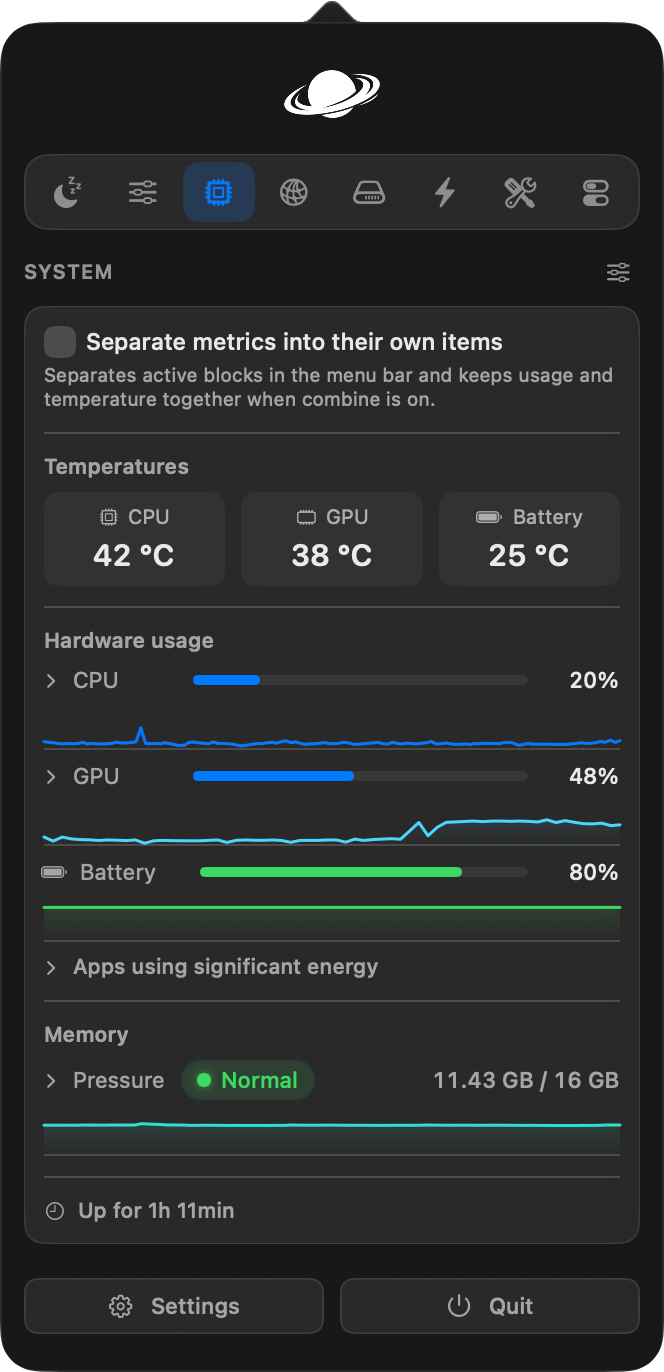
The core of it for me. Vorssaint shows CPU, GPU, and system temperatures, memory pressure, battery health and cycles, disk, and network activity in one view. The memory pressure readout is the part I check most, because it tells me at a glance whether my machine is thrashing without me having to go digging through Activity Monitor.
Battery health with cycle count is a nice touch too, just click and there it is instead of running a terminal command by hand. It's information I used to only get by opening Activity Monitor or the battery settings pane. Now it's one click away.
Quick Controls
This is the sleeper feature. A handful of toggles that save you from digging into System Settings: dark mode, mute the microphone, toggle hidden files, lock the screen, empty the Trash, eject all disks. None of these are things you do every day, but each one is a thing you eventually do, and when you need it, it's one click instead of a three-level Settings menu.
The dark mode toggle and the hidden files toggle are the two I reach for most. Being able to flip dark mode on the fly without opening the Control Center is the kind of small quality-of-life thing that quietly becomes muscle memory.
App Management
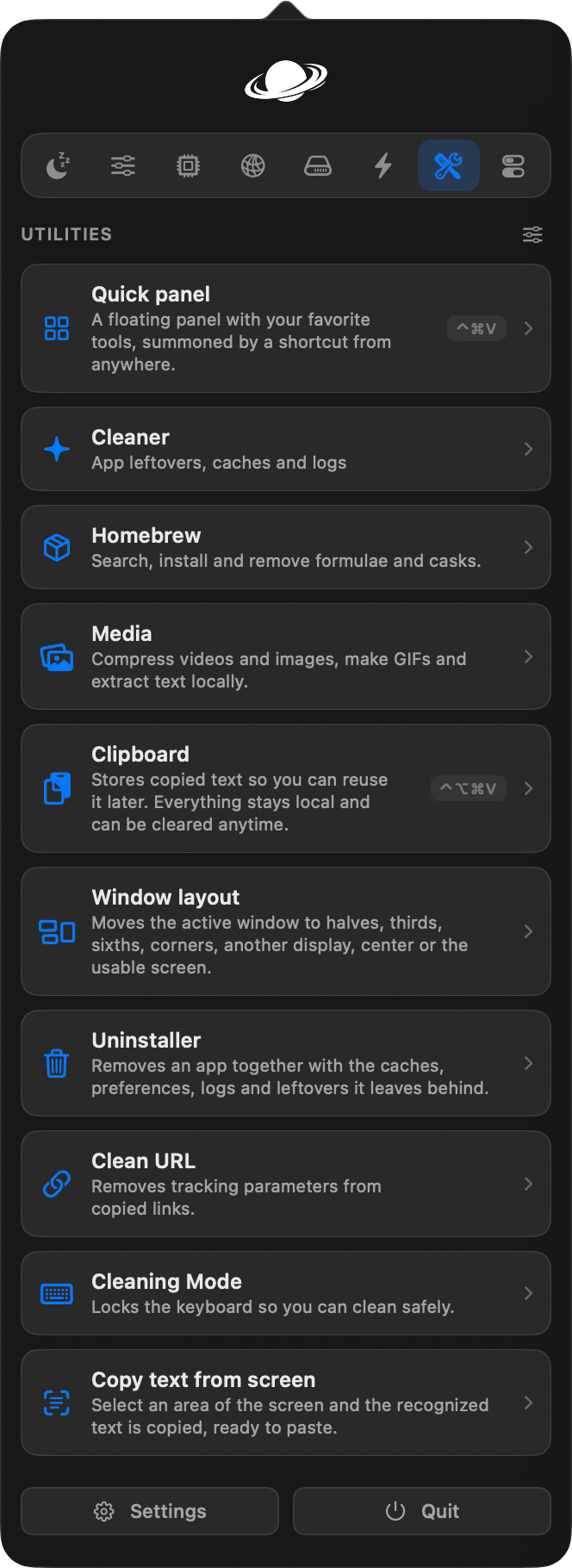
The less glamorous but very useful piece. Vorssaint handles the business of moving a downloaded app into Applications properly, and it does it cleanly. If you download a disk image that contains a single app, it can install it, eject the disk image, and move the download to the Trash for you in one step, and it's off by default so you opt in.
The nice touch is that it only ever moves things to the Trash, never deletes hard, and it keeps a review list of what it cleaned up so you can undo. That attention to safety is exactly the kind of thing I want from a tool that touches my files.
The Parts I Don't Lean On
I want to be honest about scope. Vorssaint also does Keep Awake, screen recording with separate mic and system audio tracks, a file shelf, and some deeper cleaning tools. I've barely touched those, because they're not part of my workflow. They exist, they're well built from what I can see, but this review is about the modules I actually live in. If you're shopping mainly for a screen recorder, this isn't the review for you.
Privacy, and Why It Matters Here
This is where Vorssaint has its strongest hand. Because it's open source, the privacy claim isn't a marketing line, it's something anyone can verify by reading the source code. There's no account, no cloud, no telemetry shipping your usage off somewhere. Everything runs locally on your Mac. For a category of software that has historically been a data collection point, that's a genuine, checkable difference.
It's Free. So What's the Catch?
The pricing section for Vorssaint is two words: it's free. Open source, no paid tier, no subscription, no Pro version hidden behind a paywall. You can sponsor the project if you want to support it, but nothing is paywalled.
Here's the honest angle: I wasn't paying for any monitoring or quick-toggle tool before I found Vorssaint. So this isn't a review about how one app saved me a pile of subscription money. It's better than that. It's a review about a free tool that gave me a capability I wasn't paying for at all, and gave it to me without asking for my data or a card number.
One Honest Complaint: The Disk Space Number
My one consistent pet peeve with Vorssaint: the disk space percentage it shows doesn't always match what MacOS itself reports. It's not a bug, but it's worth understanding, because on modern Macs there isn't one single true how full is my disk number.
Your Mac's storage is an APFS volume, which means the physical disk is divided up and MacOS keeps a chunk of space marked as purgeable (caches, temporary files, old Time Machine local snapshots that the system can quietly reclaim if you need the space). Different tools choose different definitions of what counts as free, and that decision is where the numbers split.
On my Mac, at the time I checked, Vorssaint showed the disk at roughly 38% used. Asking the system directly (via df, the same source Finder and Activity Monitor draw from) showed about 43% used. Both are right, and here's why they differ.
Vorssaint reads the available for important usage figure, which counts purgeable space as still available. That's the more optimistic number, and MacOS reports it as roughly 151.5 GB free on my machine. The standard available-blocks figure, which Finder and Activity Monitor reflect, does not count purgeable space as freely available. That showed about 140.1 GB free.
The physical disk is the same in both cases. The difference is about 11 GB of reclaimable space: Vorssaint treats it as you still have this, the system treats it as don't plan on this. In practice that roughly 5 percentage point gap is the difference between the two definitions, not a measurement error.
If you're using the readout to decide whether you need to clear space, the honest rule of thumb is: Vorssaint's number is the optimistic one. The space it's counting is genuinely reclaimable if you need it, so the readout is fine for everyday can I keep going decisions. But if you're planning to install something big, trust the more conservative system number.
Performance and Stability
The stability answer is the one people most want to hear, so here it is directly: in over a month of daily use, it has not crashed. Not once. For a tool this young (it's been in active 3.x development for a couple of months), that's genuinely impressive, and it's the main reason I trust running it.
Two caveats keep it at 4.5 instead of 5. It's Apple Silicon only, which is fine for me but rules out older Intel Macs. And it's still clearly maturing, with a long open-issues list on the repo. The core loop is solid, but it doesn't have the depth of a years-old product yet. That's a fair trade for free, open source, and local.
How It Stacks Up
The closest paid comparison is iStat Menus, which runs around $12 for a multi-device license and is excellent at what it does. Vorssaint covers the monitoring I actually use and doesn't ask for anything upfront. For a lot of people, that math is simple. My comparison below is honest about where each one wins.
Who Should Use It
Best for: Anyone on an Apple Silicon Mac who wants system stats, quick toggles, and app management without stacking up paid utilities, and who values the idea of their monitoring software being open source.
Good for: People coming from paid tools like iStat Menus who want solid monitoring without the license fee.
Not ideal for: Intel Mac owners (it won't run), people who need deep hardware sensor coverage beyond what it shows, or anyone shopping specifically for a screen recorder (use a dedicated tool for that).
- ✓Free and open source (GPL-3.0), with everything running locally on your Mac
- ✓No account, no cloud, no telemetry, no license key to paste
- ✓One menu bar icon instead of a pile of separate paid utilities
- ✓The quick controls (dark mode, hidden files, empty Trash) are genuinely useful muscle memory
- ✓App management installs and removes apps safely, always using the Trash
- ✓Rock solid in daily use: over a month without a single crash
- ✗Apple Silicon only, so it excludes older Intel Macs
- ✗Still young and fast-moving, with a long open-issues list
- ✗The disk space readout shows a more optimistic number than Finder (purgeable space)
- ✗No free trial concern (it's free), but the feature depth is still maturing
Final Verdict
Vorssaint is the rare free tool that earns its place in your menu bar instead of begging for one. In a month of daily use it hasn't crashed, it covers the monitoring I actually check, its quick controls save me from System Settings on a weekly basis, and it's open source so the privacy claim is something I can verify instead of trust. The disk space quirk and the young-developer maturity are the only things holding it back from a perfect score.
If you're on Apple Silicon and you've been meaning to add system monitoring or a few handy toggles but didn't want to pay for it or hand over your data, this is the tool. It's free, it's local, and after a month, I trust it.