Build Mode Review for MacOS: The Time Tracker That Can't See Your Screen
A private, one-button time tracker for Mac. No account, no cloud, no screen recording, just honest hours and a wall of progress dots. Review of features, pricing, and who should buy it.

 Build Mode
I'm quoted on the Build Mode website. Maya sent me a free license key after I mentioned I planned to review it, and I use the app every day. I wrote that testimonial because it's true.
Full disclosure up front: I'm quoted on the Build Mode website. Maya sent me a free license key after I mentioned I planned to review it, and I use the app every day. I wrote that testimonial because it's true.
Time tracking has a surveillance problem. Most apps on the market want to see your screen, read your browser history, count your keystrokes, and upload the whole picture to their cloud. That model always felt backwards to me. The point of tracking your time is to build awareness, not to be watched. Build Mode takes the opposite approach: one button, local data, no account, and a screen it never asks to see.
What Is Build Mode?
Build Mode is a native Mac app by Maya that turns focused work into a number you can watch grow. You press one keyboard shortcut to start, work normally, and press it again when you're done. That's the whole interaction. There are no projects to set up, no task lists to maintain, no timesheets to fill out.
The app counts active time only. If you step away from the keyboard or the display sleeps, the timer pauses on its own. What you get is an honest total of the hours you actually spent building, not the hours you happened to leave a timer running.
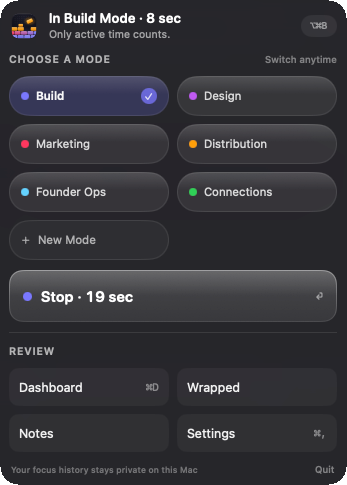
Your hours sort themselves into categories based on which apps you use. Build, Design, Marketing, Distribution, and Founder Ops are the defaults, and you can add your own or recolor the ones that ship with it. I added a Connections mode for the community and relationship work that sits outside a build session, and the app keeps the two honest and separate. The app learns locally on your Mac, so nothing about your usage ever leaves the machine.
Design and Usability
The design is where Build Mode shows its personality. It lives in the menu bar and, if you have a notched MacBook, it tucks a small session timer right into the notch while you work. There's a quiet transition when you start a session, like a small ritual marking the beginning of focused time. It sounds fussy, but it works. The deliberate start and stop becomes part of the routine.
Setup takes about a minute. You download the 5.4 MB app, paste in your license key, and pick a keyboard shortcut. There's no account creation, no email verification, no onboarding questionnaire. You press the shortcut and it starts counting.
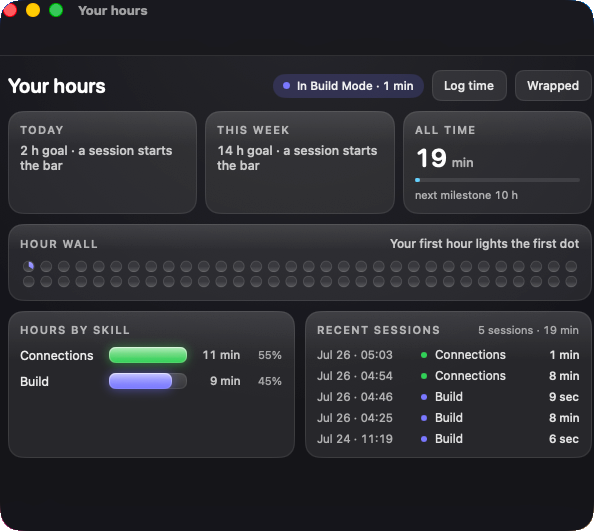
The dashboard is a single view of your progress. Daily, weekly, yearly, and all-time totals, plus a session history and your categories. The centerpiece is what the developer calls the hour wall: every completed active hour becomes a filled dot, and partial time carries forward until it earns the next one. It is not a streak. It never punishes you for taking a day off, which is the thing I like most about it.
Key Features
One-button tracking. A single keyboard shortcut starts and stops sessions. No project pickers, no timers to name, no overhead between you and the work.
Honest timing. Input inactivity and display sleep pause the session automatically. When you finish, the receipt shows exactly what that session added, separate from progress already banked.
The hour wall. Each filled dot is one completed active hour. Small sessions still count, because partial time carries forward until the next dot fills. Watching that wall grow over weeks is genuinely motivating in a way I didn't expect.
Local, automatic categories. Build Mode records which app is active and how long you use it, then sorts that time into categories on your Mac. You can correct its rules, rename categories, recolor them, or switch auto-categorization off entirely.
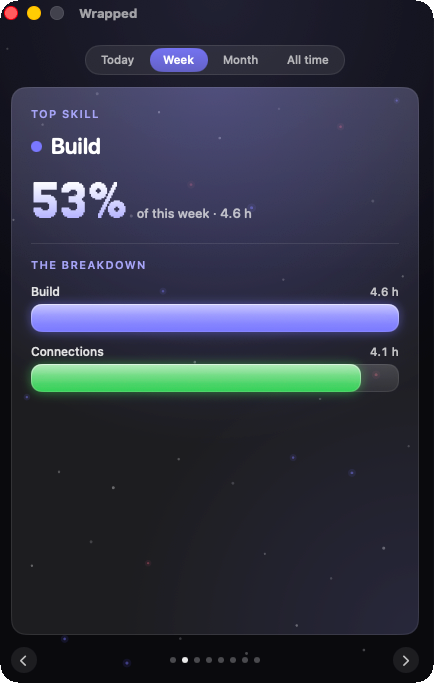
Weekly shareable card. Your hours and categories get wrapped into a shareable weekly summary, with a top skill and a breakdown you can glance at in seconds. It's a nice way to look back, and a quiet flex for anyone building in public.
Performance and Workflow
I've been using Build Mode daily since I wrote that testimonial, and it has become part of my routine in a way no other time tracker has. The shortcut is muscle memory now. I press it when I sit down to work on the site, the plugins, or any project, and I press it when I stop.
The idle detection works. I've left sessions running while I answered a message or walked away, and the app pauses and notes it. When you come back, it tells you that nothing counted while you were away. That honesty is the whole product, and it holds up in practice.
The hour wall is the feature that keeps me coming back. There's something about seeing a row of filled dots accumulate that makes the work feel real. The app is tiny, 5.4 MB, so it never slows anything down. It has no network code at all, which means nothing to misbehave in the background.
One honest note: because it's version 0.6.0, the app is early. It updates regularly and the core loop is solid, but it doesn't have the feature depth of a years-old tracker. That's a fair trade for the simplicity and the privacy.
Privacy
Privacy is the whole point of Build Mode, so this section gets more than the usual sentence. The app never takes screenshots, never reads window titles, never sees your browser, and records nothing about your keystrokes, websites, messages, or files. It contains no networking code at all. There is no account and no cloud. Everything stays on your Mac.
That is a real difference from most time trackers, not a marketing line. RescueTime, Toggl, and similar tools collect your activity data and sync it to their servers. Build Mode does the opposite. If privacy is a factor for you, and it should be, this app is in a category of one.
If privacy is a factor for you, and it should be, this app is in a category of one.
Pricing
Build Mode costs $29, paid once. No subscription, no account, no free tier, no surprise renewal. The $29 is the early builder price, down from $49, and the developer says it stays yours for good.
There's no free trial, which is the main pricing complaint I have. $29 is low enough that it's not a huge risk, but a trial would make the decision easier for skeptical buyers. What you get for the price is the full app, all features, no locked tiers, and a lifetime license tied to your email.
RescueTime runs about $9 a month, and Toggl's Starter plan runs $9 per user a month.
Comparison
The two apps people most often compare Build Mode to are RescueTime and Toggl Track.
RescueTime is the closest in spirit. It tracks your time automatically and gives you detailed reports about where your hours go. But it's a subscription, it sends your activity data to its servers, and its reports can feel like surveillance dressed up as productivity. Build Mode gives you the core value, automatic tracking and honest totals, without the monthly fee or the cloud.
Toggl Track is the favorite of teams and freelancers who bill by the hour. It's excellent at what it does, but it's project-centric. You create projects, pick tasks, start timers, and generate invoices. Build Mode is the opposite: no projects at all, just one button and a running total. If you bill clients, Toggl is the tool. If you're building something and want to watch your hours add up, Build Mode is simpler and more private.
Who Should Use It
Best for: Founders, freelancers, writers, designers, students, and career switchers putting in consistent hours on a goal.
Also good for: Anyone who wants to build a visible record of focused work without feeling monitored.
Not ideal for: People who need client-billable time tracking, detailed reports, or team collaboration. Those workflows need Toggl or Harvest, not Build Mode.
- ✓Real privacy: no account, no cloud, no screen recording, no network code
- ✓One-button tracking with automatic idle detection
- ✓The hour wall makes long-term progress visible
- ✓Tiny 5.4 MB footprint
- ✓$29 lifetime with no subscription
- ✓Categories that learn locally and stay on your Mac
- ✗No free tier or trial before you buy
- ✗Requires MacOS 14 or later
- ✗Version 0.6.0 is early, so feature depth is limited
- ✗Automatic app categorization needs occasional correction
- ✗No iOS or Android companion
Final Verdict
Build Mode is the first time tracker that ever stuck for me, and it's because of what it refuses to do. It doesn't watch your screen, it doesn't judge your habits, it doesn't charge you monthly, and it doesn't sell your attention to a dashboard. It just counts the hours you actually put in and shows them to you as a wall of dots.
Is it for everyone? No. The MacOS 14 requirement and the lack of a free trial will turn some people away, and version 0.6.0 is honest about being early. But for $29, one time, for anyone building something in the quiet and wondering if the hours are adding up, this is the easiest recommendation I can make. It's the time tracker that can't see your screen, and that's exactly why it works.