LinguaX Review for MacOS: Make Any Third-Party Mouse Feel at Home
LinguaX gives any third-party mouse a native MacOS feel: tunable smooth scrolling, button and gesture mapping, push-to-talk dictation, and automatic input source switching. $9.90 USD once, with no subscription.
 LinguaX
Full disclosure up front: the developer gave me a free license key for LinguaX after reading an article I wrote about walking away from Logitech Options+. The key did not buy my opinion, and it does not change a single sentence of this review. I had already stopped using Logitech's software before LinguaX was ever on my desk, and I explain plainly below why I would not recommend Options+ to anyone.
That article lives on my other site: Alternatives for Logitech Options+ for MacOS.
The mouse has always been the awkward part of using a Mac. Apple designs for its own trackpad and Magic Mouse, and everything else gets treated like a guest. Scroll a third-party mouse and the wheel feels stepped and abrupt, with almost none of the glide that makes Apple's hardware feel smooth. The side buttons are wasted real estate, because most mapping tools are clunky or blind to which app you're in. And if you type in more than one language, you spend your day switching input sources by hand.
LinguaX is a menu bar app that attacks all three of those problems at once, and it does it without a subscription.
Why I Went Looking for an Alternative
This review exists because of another article, so the story matters.
I stopped using Logitech products some years ago. I had used nothing but their hardware for a long stretch, and at some point the company stopped feeling like the company I had been loyal to, so I moved on. A couple of months ago I picked up a Logitech MX Master 4 for my work MacBook Air, and it reminded me exactly why I had left in the first place.
The reason is the server dependency. Logitech requires a lot of its products, including the MX Master 4, to connect to a server for the hardware to actually work. Not to check for an update. To work at all. A mouse that needs somebody else's server to be online before your buttons function is a bad design, and it is not one I am willing to live with.
Then it stopped being theoretical. The Logitech Options+ app went down for a while, and during that window my mouse did not fully work the way I need it to. My input device stopped being my input device because a company's servers had a bad afternoon. That single incident makes the whole argument against this model.
So I went looking for alternatives for MacOS, wrote up what I found, and uninstalled Options+ from my work MacBook Air. It will never be installed on any machine I own again. I would not recommend Logitech Options+ to anyone, for any reason.
That write-up is how this review happened. The developer of LinguaX read it, reached out, and offered me a license key so I could try the app properly rather than guess at it. Which brings us to what I actually think of LinguaX.
What Is LinguaX?
LinguaX is a MacOS menu bar utility from Ermulin Studio that has three core capabilities. Mouse+ makes any USB or Bluetooth mouse feel native, with tunable smooth scrolling, gesture and button mapping, and per-app overrides. Push-to-talk voice typing turns a mouse side button into a dictation trigger so your hands never leave the mouse. And input source automation switches your keyboard language by app and by website domain, so the right language is waiting when you start typing.
The app is around 10MB and written in Swift rather than wrapped in a web view, which is roughly one fiftieth the size of the mouse software it competes with. There's no driver to install and no account to create.
Mouse+ Enhancement
Smooth scrolling is the change you feel in the first minute. Instead of the stepped response MacOS gives a third-party wheel, LinguaX exposes the scroll curve itself, with controls for step size, speed gain, and inertia duration. You can shape it until it feels like Apple's hardware, or until it simply feels right to you, which is the more useful target.
Scroll preferences change with context, and this is where the per-app overrides earn their place. You can set smooth scrolling one way globally and override it for a specific app, so a long-document reader and a canvas-heavy design tool don't have to share the same feel.
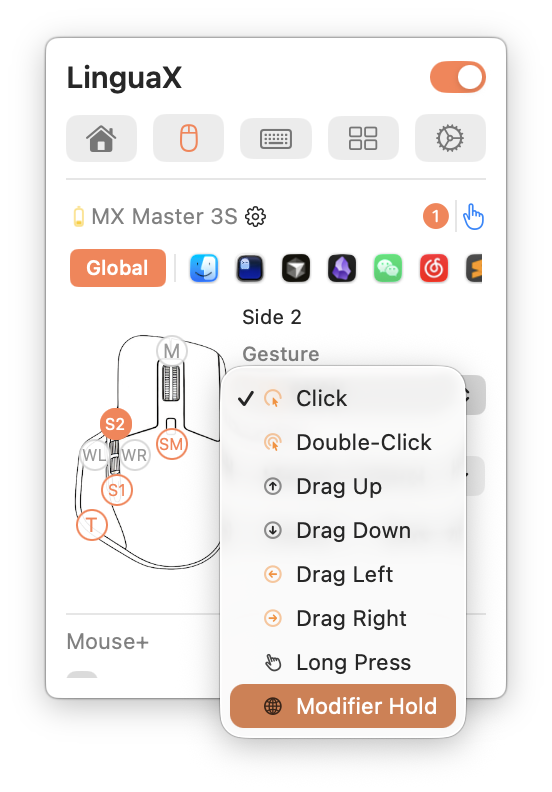
Button mapping covers clicks, long presses, and directional drags, and maps them to real actions: launching an app, system controls, media keys, or a custom script. Mapping is also app-scoped, so one button can mean one thing in your editor and something else in your browser. If you came from vendor software that assumed everyone owns the same brand of mouse, this is the part that feels like an upgrade rather than a workaround.
You can see the full mouse-side feature list at linguax.app, and there is a device compatibility database if you want to check your own mouse before installing anything.
This is the part I can speak to from my own desk. My daily mouse is a Logitech G502 X Lightspeed, a gaming mouse with 13 programmable controls, which is a lot more buttons than MacOS knows what to do with on its own. LinguaX picked it up with no driver to install, and mapping the extra buttons took a couple of minutes. The thumb buttons became back and forward, one went to a screenshot action, and another launches an app I use constantly. I ran into no issues at all during setup, which is the part that surprised me most, because button remapping tools usually cost you at least one round of troubleshooting before they behave.
How I Run ItPush-to-Talk Voice Typing
The idea here is deliberately small. LinguaX can map a side button to hold the Globe (Fn) key. While you hold it, MacOS Dictation is active. Release it, and dictation stops. It works like a walkie-talkie, and your hands never leave the mouse.
Because all it's really doing is holding a key, it works with whichever dictation engine you already like. That includes built-in MacOS Dictation and push-to-talk apps such as Wispr Flow and superwhisper. If your complaint about dictation has always been that reaching for the keyboard defeats the point, this removes the reach.
There is a full push-to-talk setup guide on the LinguaX site if you want to see the steps before you try it.
Automatic Input Source Switching
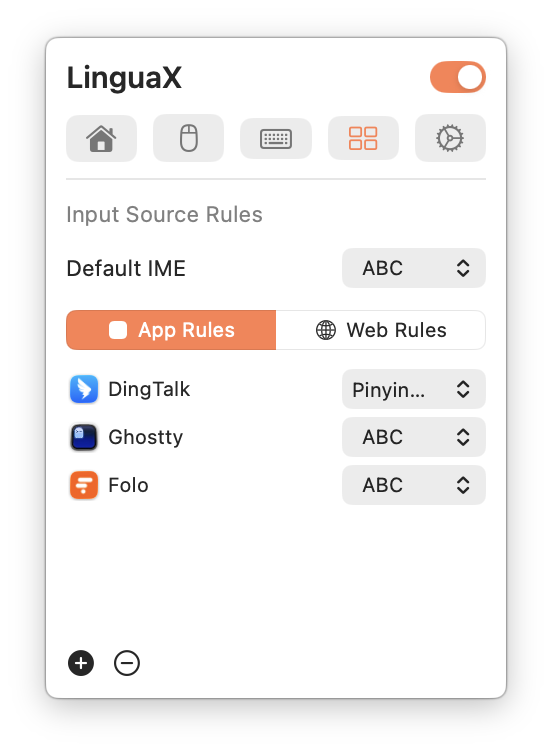
If you work across languages, this is the feature that quietly changes your day. You set one rule per app and one rule per website domain, and LinguaX switches your input source whenever your focus changes. A chat app can get one language, a code editor another, and a specific domain a third. When no rule matches, it falls back to your default input source instead of guessing.
It runs in the background and stays invisible when it's working, which is the correct behavior for this kind of automation. The thing you notice is the absence of the manual switching you used to do dozens of times a day.
Setup and Design
Setup is a short permission walkthrough rather than a wizard. On first run LinguaX steps you through granting Accessibility and Input Monitoring, with live status hints so you can tell when each one has actually taken effect, and the onboarding is localized in nine languages. After that the app lives in the menu bar and stays out of the way.
It's worth being clear about what those permissions mean, because this class of app needs them. Accessibility and Input Monitoring are what let LinguaX see your clicks and hold a key for dictation. Any tool that remaps mouse buttons or automates input needs that access, so it isn't a red flag specific to LinguaX, but it is a real consideration whenever you grant it.
Privacy
Rules are stored locally on your Mac, and iCloud sync is optional and off unless you turn it on. The app's AI feature is described as on demand, meaning text leaves your machine only when you request an action and agree to the transfer first. For a utility that sits in your input path, keeping the core behavior local is the right default. You can read more in the privacy and security docs.
Pricing
LinguaX starts with a 30-day full-feature trial. Everything is unlocked during that window, so the point is to judge it on real work rather than a demo mode. After the trial it's $9.90 USD one time for a Lifetime license, which covers up to 3 Macs. There's no subscription and no renewal, and there's a 3-day, no-questions-asked refund window.
The honest comparison isn't another paid app, it's free software, and there is a lot of it. LinearMouse is free and capable, and so are Mac Mouse Fix, BetterMouse, and SteerMouse. A one-time $9.90 is easy to justify for a utility you install once and then live in, especially against subscription pricing that asks for that amount every month. Just be clear-eyed about what you are buying: you are paying for the combination of smooth scrolling, any-mouse support, voice input, and input source automation in one app, not for features that exist nowhere else for free.
Current pricing and the trial-to-Lifetime breakdown are on the LinguaX pricing page, including the 3-day refund window.
One practical note on the license tiers: the trial covers a single Mac, so if you want LinguaX on both a laptop and a desktop, the paid Lifetime license is the one that includes up to 3 Macs.
How It Stacks Up
The app I am comparing LinguaX to is the one I left, and I will be direct about it: I would not recommend Logi Options+ to anyone, for any reason. It is free and it is limited to Logitech hardware, but that is not the problem. The problem is the architecture. The hardware depends on a server connection to function, and when that app had an outage my mouse stopped behaving the way I need it to. If my input device can be degraded by somebody else's downtime, it is not software I am going to keep installed.
LinguaX works on a completely different model. It runs locally, it supports any USB or Bluetooth mouse, and it does not ask a server for permission before your buttons do their job. That single difference is the reason it is on my machine and Options+ is not.
LinguaX is also not the only alternative out there, and I want to be straight about that. When I first went looking I wrote up several options, including LinearMouse, Mac Mouse Fix, BetterMouse, and SteerMouse, and any of those may fit depending on what you need. LinguaX is the one that ended up on my desk because of the combination: smooth scrolling and button mapping for any mouse, plus push-to-talk voice and input source automation that the others do not really cover.
Who Should Use It
Best for: Anyone using a third-party USB or Bluetooth mouse on a Mac who wants smoother scrolling and buttons that actually do something useful.
Also good for: People who work in more than one language and want their input source to follow the app or site they're in, and anyone who wants dictation without reaching for the keyboard.
Not ideal for: People who only use Apple's own trackpad or Magic Mouse and are happy with it, or anyone unwilling to grant Accessibility and Input Monitoring permissions to a utility.
- ✓Makes any USB or Bluetooth mouse feel native, no Logitech lock-in
- ✓Fully local, so no server outage can break your mouse
- ✓Genuinely tunable smooth scrolling with per-app overrides
- ✓Push-to-talk dictation: hold a side button, release to stop
- ✓Automatic input source switching by app and by website domain
- ✓One-time $9.90 USD, no subscription, up to 3 Macs
- ✓Tiny ~10MB native Swift app, no Electron bulk
- ✓No account required, and your rules stay local
- ✗Needs Accessibility and Input Monitoring permissions
- ✗Dictation itself still relies on MacOS Dictation or another engine
- ✗Trial covers a single Mac; 3 Macs needs the paid license
- ✗Refund window is only 3 days
- ✗Plenty of advanced options, so first setup takes some exploring
- ✗It is a paid app when capable free alternatives like LinearMouse exist
Final Verdict
LinguaX solves a problem that MacOS users have mostly learned to tolerate. A third-party mouse on a Mac feels slightly wrong all day, and the usual fix has been vendor software you do not control or nothing at all. LinguaX makes any mouse feel native, adds per-app control, and then throws in two features that no competitor in this space really has. Just as importantly, it does all of that locally, with no server dependency waiting to break your mouse on a bad afternoon.
The trade-offs are honest ones. It needs input-level permissions, the trial is single-Mac, and the refund window is short. None of that changes what the app does, and at $9.90 USD for a lifetime license with no subscription, there's very little risk in trying it before you decide. If you use a third-party mouse, it's an easy recommendation.
You can see everything it does, check your mouse against the compatibility list, and download the free trial at linguax.app.