MemoryString Review for MacOS: Free Slideshows From a Folder of Photos
MemoryString turns a folder of photos into a finished movie in minutes, on your Mac, for free. What Long story short gets right, and where the app still has edges.
You have thousands of photos on your Mac and you have shown people maybe a dozen of them. Sorting them into something watchable has always meant an evening in iMovie, or handing the job to Photos and accepting whatever Memory Movie decides. MemoryString takes the third path: point it at a folder, pick a look, and it hands you a finished movie in minutes. It's free, and it never uploads a thing.
 MemoryString
What MemoryString Actually Is
A native Mac app that turns photos and videos into an H.264 MP4 without pretending to be a video editor. You drop in a folder, or import from Photos, and it builds the show around you: best shot from each burst, long videos trimmed down, movement on every still, music underneath, and captions carrying the place and the date pulled from the photo's own metadata.
The whole thing runs on your Mac. No account, no sync, no cloud library.
How I Actually Used It
Here's a use case nobody at the app's website wrote down, which is now the way I use it most.
I generate images every day, hundreds of them in a batch. They land in folders with names like November 23 2026 Prompt 99, and each one is a still frame from a world that doesn't exist. Until MemoryString, showing anyone that work meant either a folder of files or a slow scroll through Finder.
Now I point MemoryString at a batch folder, pick a length, and get a short film out of it. The stills get slow movement, the cuts land on a beat, and the whole thing exports as an MP4 I can send. It's the fastest I've ever turned a folder of generated images into something a person would actually watch.
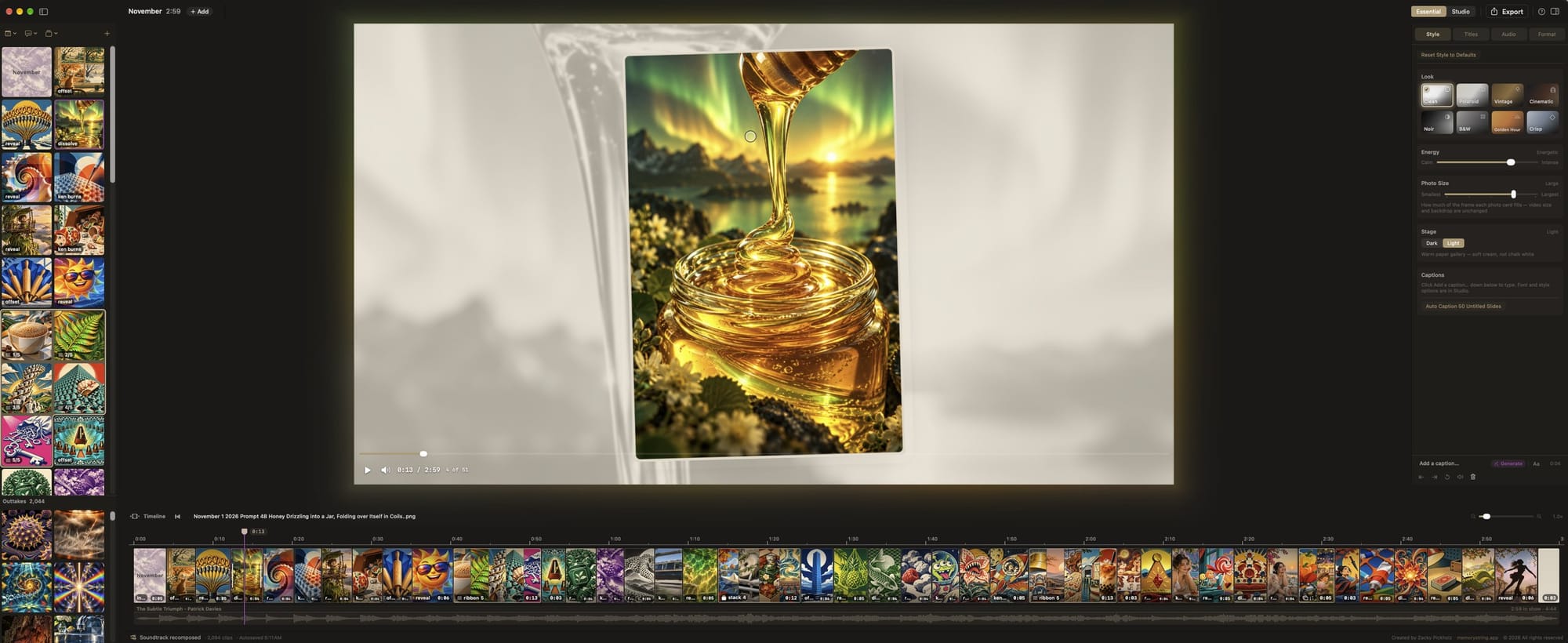
I ran it several times over a few different batches. I didn't put a stopwatch on it, because the exports never got in the way. On an M6 Mac Mini they finish in minutes, while you're still deciding what to do with the rest of the afternoon.
Long story short is the reason I keep opening it. Point it at the folder, choose a length, and it thins hundreds of near-identical images down to the ones that carry the idea, spreads them across the whole run, and hands the rest to Outtakes where they're still there if it guessed wrong. It guessed right far more often than I expected. That single feature does the work I used to do by hand, and it does it in the time it takes to make coffee.
Long Story Short Is the Feature Worth the Download
Most slideshow apps assume you've already curated. MemoryString assumes the opposite.
You point it at hundreds or thousands of files, choose a length between one and 30 minutes, and it does the choosing. Best shot from each near-duplicate group, spread across the whole trip so a single afternoon doesn't dominate the first act, and everything it passes over goes to Outtakes, where you can pull it back. Nothing gets deleted from your Mac, ever.
Two details show the app was made by someone who has actually done this. The duration slider stops at what the photos can genuinely fill, and it tells you how many distinct shots it counted while it works. The finished movie lands within about 10 seconds of the length you asked for. A tool that explains its own limits is rare.
Everything Else You Get
- Eight Looks applied with one chip, plus energy, photo size and a light or dark stage
- 17 transitions and six multi-photo group styles, including photo stacks, carousels and a 3D ribbon
- Auto Caption in one click, filling each photo with its place and date from EXIF
- 50 built-in royalty-free tracks (CC0), level-matched so nothing blasts in the middle of the show, plus your own music
- Fit Show to Music, which stretches the show so the song lands on the end card instead of stopping halfway
- Frames for every destination: 9:16, 4:5, 1:1, 3:2, 4:3, 16:9 and 21:9
- 1080p or 4K export at your choice of bitrate
If you want a place to start, take Golden Hour with the stage set dark. It keeps the sun out of faces and keeps the end card the same warm tone as the slides, so the show doesn't fall apart in its last three seconds. For music, hit Surprise me once and then use Pick New Music until something fits. Every track in the catalog is CC0 and leveled to the same comfortable volume, so you're choosing a mood rather than riding a fader.
Two Depths, One App
Essential and Studio are the same app at two levels, switched from the toolbar, sharing one project file. Essential gives you Style, Titles, Audio and Format. Studio adds a Motion tab with plate and ambience, lens effects, film grain, atmosphere and decals, plus full typography control on captions and titles.
That's a good decision. The default screen stays calm, and the control is there when you want it rather than sitting in your face from the first launch.
It's Not an Editor, and It Says So
MemoryString caps at 30 minutes, and it isn't trying to reach the file you'd cut by hand. Hand-set slide lengths and transitions get cleared when Long story short rebuilds a show. The developer's own known-issues page is unusually honest: album thumbnails from large Photos libraries can stall on first load, importing several hundred assets at once can spike memory use, and big projects can make the library and timeline feel heavy. None of that bit me on the batches I ran, and I'd rather see a list like that than a claims page.
I shared this review with the developer and he got back to me with this information about the memory issue I mentioned above and I wanted to share his words while leaving my original work intact.
“The app now adapts at runtime to your Mac’s resources and load, so it shouldn’t hog memory, hang or stall. At worst, importing, warming a show and exporting might run a touch slower.”
Zacky Pickholz, developer of MemoryString
Privacy
The pitch is blunt and correct. Nothing is uploaded, no account exists, and no model sees your library. Location and date come from the photo's own metadata rather than from you typing your home address into a form. The only outbound traffic is optional crash reporting, which you can turn off. The full privacy policy says the same thing in more words.
For family photos, that difference is most of the argument. For generated images, it means a batch turns into a film without a single file leaving your machine.
What It Costs
Nothing. Free from the Mac App Store or as a direct DMG from memorystring.app, with no in-app purchase, no subscription and no ads. There's a sponsor page for a Windows build, which is funding rather than a paywall.
How It Compares
Against Apple Photos, which builds memory movies for free and does a good job with them, the difference is control and length. Photos picks a style and a duration for you. MemoryString lets you choose 30 minutes, edit on a timeline when you care, and export at 4K.
Against iMovie, which is also free, the difference is time. iMovie can do more, and it will cost you an evening. MemoryString is the app for the person who was never going to open iMovie.
One Thing I Didn't Test
MemoryString ships a local MCP server on 127.0.0.1:18765 that lets an agent drive the open project: import, restyle, scrub, export, all without clicking through panes. It's off until you enable it, it only listens on your own Mac, and every request needs a token. I haven't put it through its paces, so treat that as a pointer rather than a verdict, but it's a genuinely unusual thing to find in a free photo app and I'll be back with a real opinion.
Pros and Cons
- ✓Long story short picks the shots for you and picks them well
- ✓Nothing uploads, no account, no subscription, no ads
- ✓Auto Caption fills in place and date from the photo itself
- ✓50 level-matched tracks plus your own music
- ✓1080p or 4K export in seven frame shapes
- ✓Essential and Studio give you one app at two depths
- ✗30-minute ceiling on a single show
- ✗Large libraries can stall or use a lot of memory, by the developer's own list
- ✗It's a slideshow maker, not an editor with cutting tools
- ✗Rebuilding with Long story short clears hand-set timing
Who Should Use It
Anyone with a big camera roll and a deadline: a birthday, a graduation, a trip you just got home from. Parents, grandparents, and the person in the family everyone sends photos to. Same for anyone generating images in bulk who wants motion on them without opening a video editor. If you need frame-accurate cutting, transitions matched to a beat, or a color grade, this isn't that app, and it isn't pretending to be.
Final Verdict
MemoryString solves the part of slideshow making that people actually fail at, which is deciding which of thousands of photos deserves the screen and in what order. Long story short does that automatically, on-device, in a free app with no account, and it does it well enough that I stopped curating by hand.
The rough edges are performance on enormous libraries, a 30-minute ceiling, and the fact that it isn't an editor. All three are documented rather than hidden, and none of them cost me anything on the work I actually do.