Paste: The Clipboard Manager You'll Wonder How You Lived Without
Discover our in-depth review of Paste for MacOS, a powerful clipboard manager that offers unlimited clipboard history, lightning-fast search, iCloud sync, and smart organization. See whether Paste is worth the price and if it's the right productivity utility for your Mac.
 Paste
PasteIf you've ever found yourself copying one thing only to realize you've just overwritten something important, you're not alone. MacOS includes a clipboard, but it's limited to storing just one item at a time. That's where Paste comes in. Developed specifically for Apple devices, Paste transforms your clipboard into a searchable, organized history that remembers everything you copy.
Whether you're a writer juggling research, a developer working with code snippets, a designer collecting inspiration, or simply someone who copies and pastes throughout the day, Paste has the potential to become one of the most indispensable utilities on your Mac.
After spending considerable time using Paste in everyday workflows, it's easy to understand why it has become one of the most highly regarded clipboard managers available for MacOS.
What Is Paste?
Paste is a premium clipboard manager designed exclusively for Apple's ecosystem. Instead of replacing the standard MacOS clipboard, it enhances it by creating a complete history of everything you copy—including text, links, images, files, code snippets, and more.
Unlike basic clipboard utilities, Paste emphasizes organization just as much as history. Everything you copy is presented in an elegant visual timeline that makes finding previously copied items effortless.
Even if you copied something hours, days, or weeks ago, Paste can usually retrieve it within seconds.
Installation & Setup
Getting started couldn't be much easier. For me, I use the version from SetApp since I subscribe to SetApp already for a lot of other apps they offer.
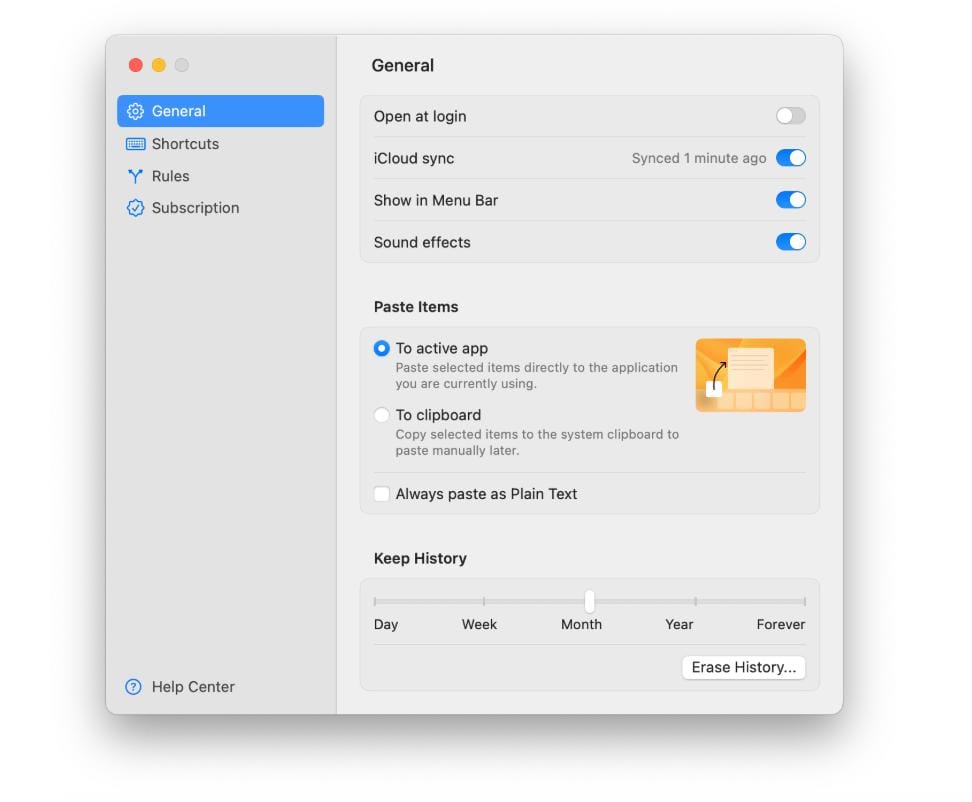
After installing Paste, the application quietly lives in your menu bar. There's virtually no learning curve for basic functionality. As soon as the app launches, it immediately begins saving everything you copy.
The default keyboard shortcut opens your clipboard history instantly, allowing you to browse previous clips without interrupting your workflow. You can also change the keyboard shortcut to your liking so that you can quickly open up the Paste clipboard as quickly as possible.
For users who enjoy customization, nearly every shortcut and behavior can be adjusted to fit personal preferences.
Search & Organization
Finding something copied weeks ago is surprisingly easy. Paste includes an incredibly fast search engine capable of locating clipboard items almost instantly.
Even better, you can organize clips into custom collections such as the examples below.
- Frequently Used
- Work
- Coding
- Personal
- Writing
- Shopping
- Research
For me, I use categories such as Slack, Reddit, Facebook, Zendesk, Masterclass and a couple of others. These are very specific to my job at Skylight.
Rather than endlessly scrolling through clipboard history, collections allow important snippets to remain permanently accessible. For users working on multiple projects simultaneously, this organization becomes incredibly valuable.
iCloud Sync
One feature that truly separates Paste from many competitors is seamless iCloud synchronization.
Your clipboard history automatically syncs across supported Apple devices, allowing you to copy something on your Mac and later access it from another Apple device signed into the same iCloud account.
The synchronization happens quietly in the background and generally feels effortless.
For users invested in Apple's ecosystem, this significantly enhances productivity. This is definitely something I use quite often. Not necessarily between a Mac and an iPhone device as a lot of users would, but between my personal M4 Mac Mini and my work MacBook Air.
Smart Filters
Paste intelligently categorizes different types of clipboard content. Instead of browsing one long list, users can quickly filter based on things mentioned below.
- Text
- Images
- Links
- Files
- Code
- Screenshots
This dramatically reduces the time required to locate older clipboard entries. Combined with instant search, Paste rarely leaves you hunting for copied content.
Privacy & Security
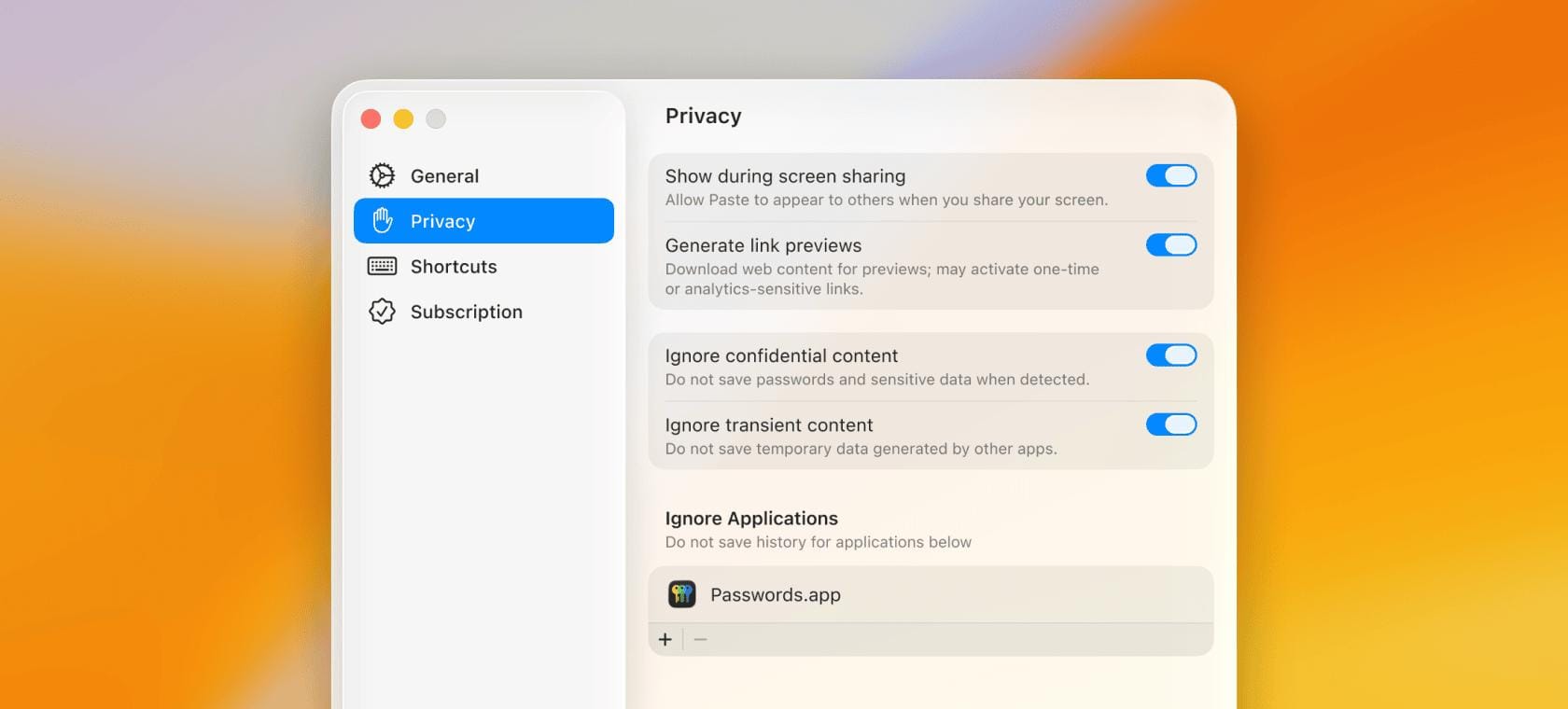
Clipboard history often contains sensitive information, making privacy an important consideration. Paste addresses this in several ways.
- Exclude specific applications from being tracked.
- Clear clipboard history whenever desired.
- Customize retention periods.
- Control synchronization settings.
- Prevent sensitive content from being stored.
While users should always exercise caution when copying passwords or confidential information, Paste provides a solid collection of privacy controls.
Pricing
Paste is available through several purchase options:
- $3.99/month
- $29.99/year
- $89.99 Lifetime License
A free trial allows users to evaluate the software before committing. Additionally, Paste is included with a Setapp subscription, making it an excellent value for anyone already using Setapp.
Where Paste Could Improve
Although Paste is one of the best clipboard managers available, there are a few areas where it could be even better. Advanced organizational features can initially feel overwhelming for users who only need basic clipboard history.
Because Paste is designed specifically for Apple platforms, users working regularly on Windows or Android won't enjoy the same seamless experience across all of their devices.
The subscription pricing may also discourage some users, although the lifetime purchase option helps address that concern. Finally, the sheer number of available features means some users may never fully utilize everything Paste offers.
Final Verdict
- ✓Beautiful, native MacOS design
- ✓Unlimited clipboard history
- ✓Extremely fast search functionality
- ✓Excellent organization through custom collections
- ✓Seamless iCloud sync across Apple devices
- ✓Supports text, images, files, links, and code snippets
- ✓Low system resource usage
- ✓Flexible privacy controls
- ✓Lifetime purchase option available
- ✓Included with Setapp
- ✗Best experience is limited to Apple's ecosystem
- ✗Advanced features may take time to fully explore
- ✗Subscription pricing may not appeal to every user
- ✗Power users benefit most; casual users may not need every feature
Paste successfully transforms one of MacOS's most overlooked limitations into one of its greatest strengths.
Its combination of elegant design, lightning-fast search, intelligent organization, and seamless iCloud synchronization creates an experience that feels remarkably polished. Rather than acting as a simple clipboard history tool, Paste becomes an integral part of your daily workflow.
While there are several clipboard managers available for MacOS, few strike the same balance between aesthetics, usability, and powerful features. The thoughtful interface makes it approachable for newcomers, while advanced organizational tools provide plenty of depth for power users.
If your daily routine involves copying and pasting information—even occasionally—Paste can quickly become one of those rare applications you wonder how you ever lived without.
Paste is one of the finest clipboard managers available for MacOS. It blends an elegant interface with powerful productivity features in a way that feels completely at home on Apple's platform. Whether you're a professional who lives in front of your Mac or simply someone tired of losing copied content, Paste is a utility that's easy to recommend—and one that quickly proves its value.