KeyKeeper Stores All Your MacOS License Keys
KeyKeeper is the ultimate solution for managing your software license keys, designed specifically for macOS users. No more fumbling through scattered text files or endless emails to find that one elusive license key.
KeyKeeper is an app I found pretty early on in my switch from Windows to MacOS about 18 - 20 months ago. It's the ultimate solution for managing your software license keys, designed specifically for macOS users. No more fumbling through scattered text files or endless emails to find that one elusive license key. With KeyKeeper, all your licenses are stored in one secure, easy-to-access vault, making it the perfect tool for anyone who values organization and security.
 KeyKeeper
What Is KeyKeeper?
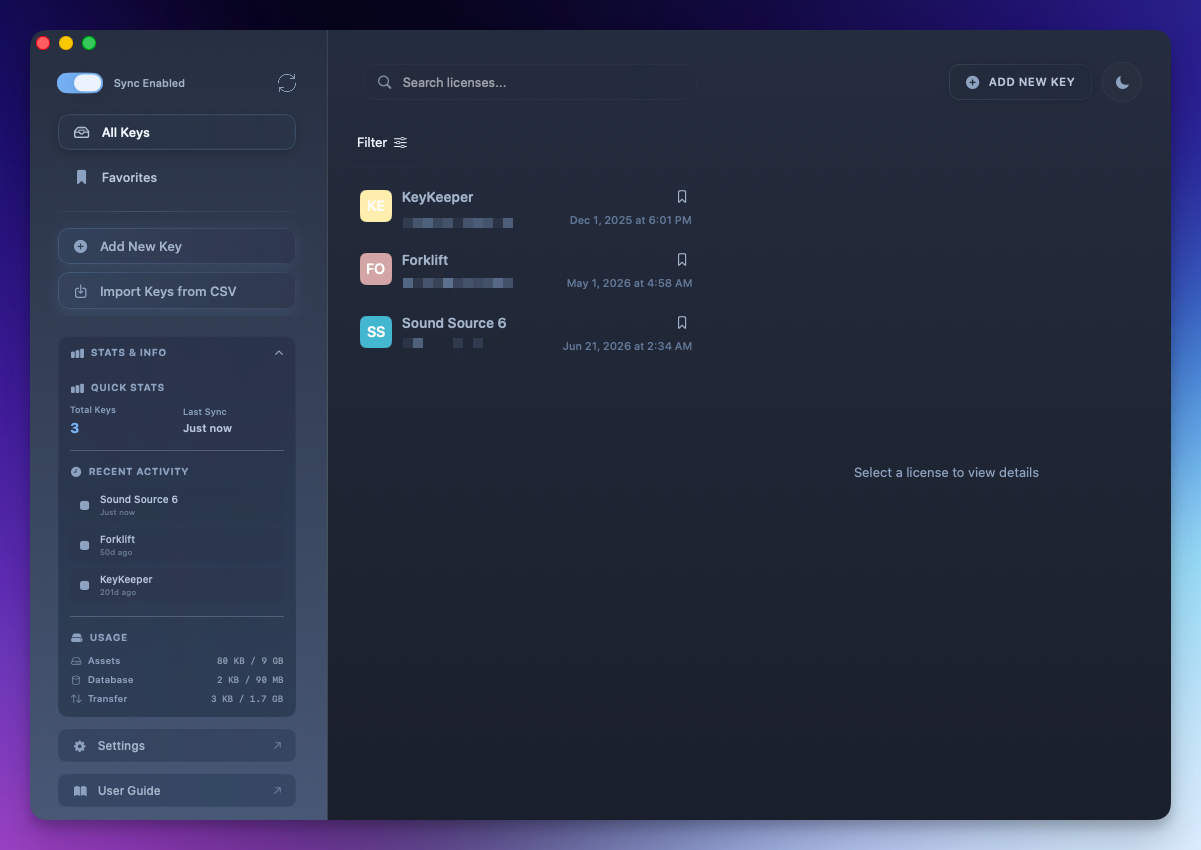
KeyKeeper offers an intuitive and sleek Mac-native interface that makes it easy to manage your licenses without any unnecessary complexity. The app is optimized for seamless use across multiple devices, thanks to its iCloud sync feature, which keeps your license data up to date on all your Macs. Whether you’re at home, in the office, or on the go, your license keys will always be within reach. This is extremely useful for those of us like myself who have multiple Mac devices in various places.
Security And iCloud Sync
Security is a top priority with KeyKeeper. Your license information is safely encrypted and protected behind a master password, giving you peace of mind that your sensitive data remains private. This is very similar to how most password manager apps work and it works quite well. The app also features a lightning-fast search function, enabling you to locate any license within seconds. With the one-click copy feature, you can effortlessly copy and paste your license keys, avoiding the hassle of manually typing them out.
Advanced Features
For users with extensive collections of software licenses, KeyKeeper offers advanced features such as CSV import/export, allowing you to import your entire library in just one step or export it for backup or sharing purposes. Custom sorting and the ability to add personalized fields give you full control over how your licenses are organized and displayed. The sleek dark mode makes using the app easy on the eyes, whether you’re working during the day or late at night.
KeyKeeper even allows you to store important attachments like images, screenshots, or setup instructions directly alongside your licenses, providing a comprehensive and organized solution for managing your software assets. And with the offline mode, you can access your licenses even when you don’t have an internet connection.
Whether you’re an individual user managing personal licenses or a professional with dozens of software licenses, KeyKeeper is your go-to tool for license key management.
KeyKeeper Features At A Glance
Below is a list of some of the features of KeyKeeper, just so you can see if it includes the things you need or want from a license keeping app.
Pricing
Currently, KeyKeeper is $19.99 for a lifetime license. However, if you keep an eye on BundleHunt, you'll often find it on sale for a much cheaper price. I got my license for $6.99 about a year ago I believe due to a random post I saw on Mastodon. I gladly would have paid the full price of $19.99 as to me, this app is fully worth every penny of that.
Final Thoughts
If you'd like to connect with me on social media, you can do so via Mastodon by clicking the button below. I'd love to hear any feedback, comments, suggestions or anything from you as well. You can do that in the comments on this post or again, via Mastodon if that is your preferred platform.