Now Playing On Your Status Bar: Status Bar Music Player
If you're looking for an easy, quick way to display the music in your MacOS status bar, look no further than Status Bar Music Player.
When I started my MacOS journey about 18 months or so ago, I quickly learned you can do some of the most basic stuff much quicker and easier than you can when you're using Windows. One of those things I learned about was displaying what song I'm currently playing right within my status bar. So I went on a search, and quickly stumbled across Status Bar Music Player.
 Status Bar Music Player
What Is Status Bar Music Player?
It advertises itself as being compatible with Apple Music and Spotify, which was perfect since I had switched over to using Apple Music a year or so prior. Status Bar Music Player is a simple music player that resides entirely on your status bar. You can see Artist and Song name at just a glance. Powerful buttons system to let you control playback right there on the status bar. And with just one click away, you can see the beautiful Artwork, Album and Timestamp of the currently playing song!

Why I Use It Daily
I quickly discovered this was exactly what I wanted and needed. It lived right in my status bar and I could easily always see exactly what song was playing at the time. This allows me to discover new music regularly, especially when I'm not listening to my own playlist of music.
When I hear a song I don't recognize and/or sounds nice, I take a quick glance at the status bar, and voila, I know exactly what song and artist that I'm listening to. I use this all day every day, since I literally play music for the 12+ hours I'm sitting at my computer.
Customization Options
As mentioned above, Status Bar Music Player has a powerful button system that you can customize to your liking right within the settings of the app. Plus you can change the position of the buttons on the player, have it show the Song And Artist Name, Name Only or just the App Icon. You can change the size of the media player and quickly switch between Apple Music and Spotify. You can even record a keyboard shortcut to quickly open Status Bar Music Player and of course decide if you want it to open at Login.
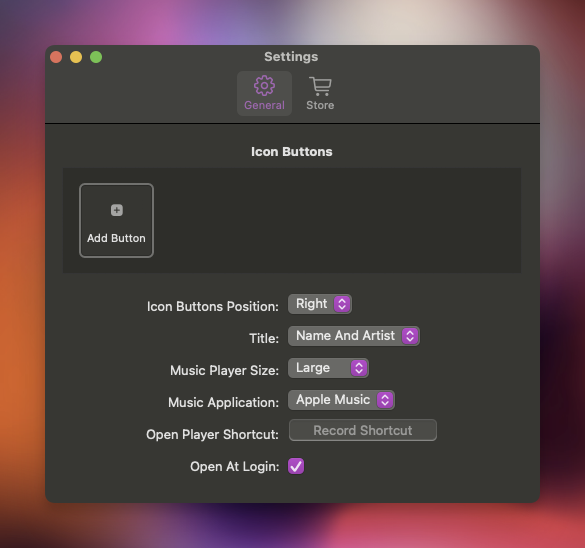
Powerful Buttons At A Glance
Below is a list of the things you can do with the powerful button system. This makes Status Bar Music Player act and behave pretty much however you want it to, which is exactly what I was looking for.
- PLAY/PAUSE right there on the status bar!
- Play NEXT or PREVIOUS song right there on the status bar!
- REPEAT right there on the status bar!
- SHUFFLE right there on the status bar!
- LOVE/LIKE current song right there on the status bar!
Pricing
Status Bar Music Player comes with a full 30-day free trial. This allows you to really take it for a spin and decide if it's useful for you personally. After that, you pay just $1.99 if I'm not mistaken, one-time, and that's it. Very cheap, very affordable but does everything I wanted and needed it to do when I went searching.
Final Thoughts
While this isn't a very in-depth review, the good thing is that Status Bar Music Player is a simple app that does exactly what it needs to do. It simply displays the music your listening to right in the status bar for you to take a quick glance at and know what's playing. That's it and that's all I needed and wanted from an app like this.
Let me know in the comments if you use Status Bar Music Player, or if you use something else that is similar. I'm always looking for new apps that I can try as well as possibly do a little review of them right here on PureApp.reviews!
If you'd rather reach out to me on Mastodon, you can do so here: Cliff on Mastodon.